Blocktomic — Workout & Timer Guide
How to create, customize, and run workouts in Blocktomic.
Understanding Workout Structure
A workout in Blocktomic is organized like this:
Workout
├── Round 1 (repeats N times)
│   ├── Block 1  (e.g., 20s Sprint)
│   ├── Block 2  (e.g., 10s Rest)
│   └── ...
│   └── Rest between rounds (optional)
├── Round 2
│   └── ...
└── etc.
Terminology
| Term | Meaning |
|---|---|
| Block | A single interval or exercise (e.g., “20s Sprint”, “10 reps Bench Press”) |
| Round | A sequence of blocks that repeats N times |
| Rest between rounds | Recovery time after completing one full round |
| Workout | The complete session (all rounds + all blocks) |
Block Types
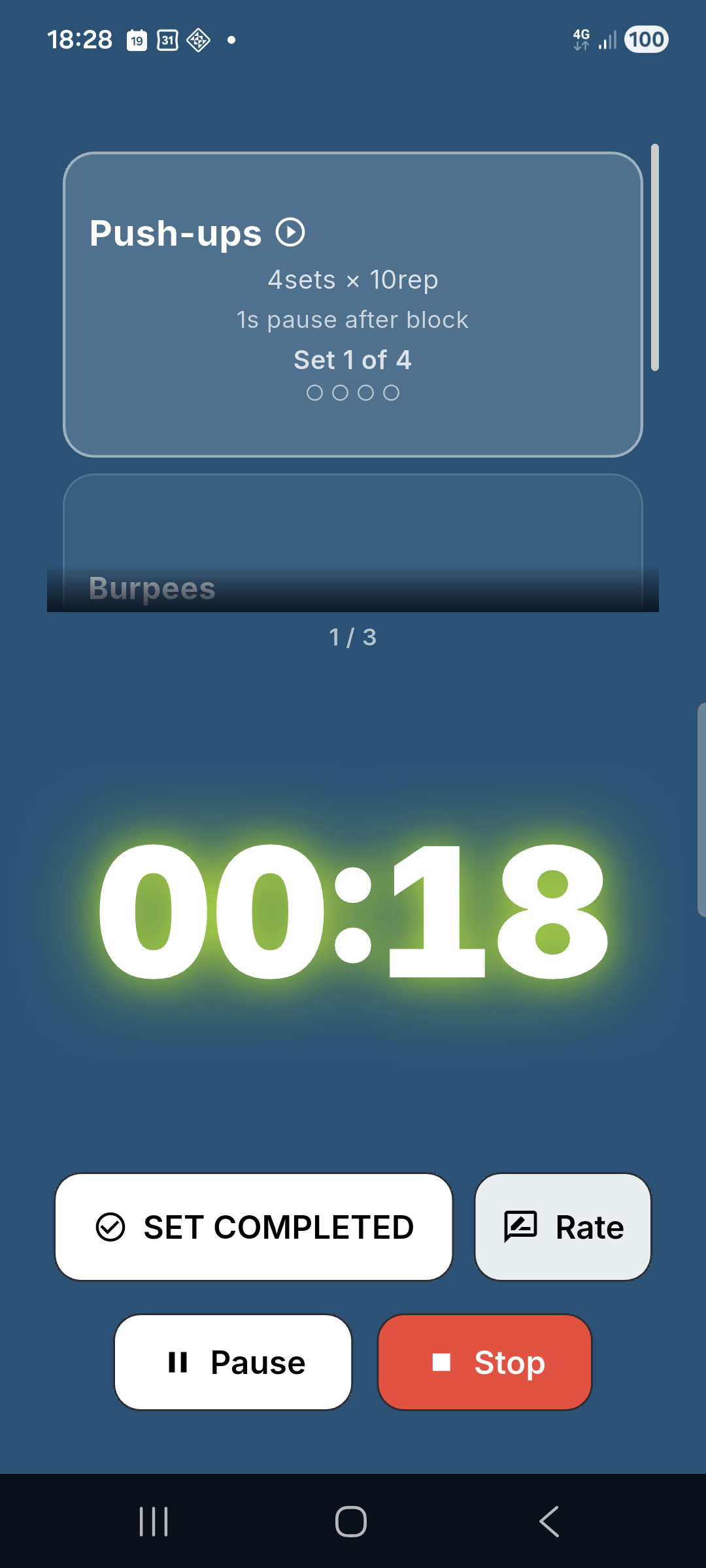
Each block can be one of these types:
Time Block
Countdown timer. Set seconds or minutes:seconds.
Use for: Tabata intervals, timed exercises, rest periods.
Example: 20s work / 10s rest (classic Tabata).
Distance Block
Track distance using GPS or manual input.
Use for: Running, cycling, walking, rowing intervals.
Example: Run 400m, Cycle 1km.
During the workout:
- With GPS: the progress bar fills automatically as you move.
- Without GPS: tap the distance button to enter distance manually.
Reps Block
Track sets and repetitions. No timer — mark sets as completed.
Use for: Gym exercises, strength training.
Example: Bench Press — 3 sets × 12 reps @ 60kg.
During the workout:
- Tap to mark a set as complete.
- Optionally log weight used.
Open-Ended Block
Stopwatch-style block with no preset duration or target.
Use for: Stretching, cooldown, exercises where duration varies.
Example: Stretch — finish when ready.
During the workout:
- Timer runs upward.
- Tap Complete when you’re done.
Block Kinds
| Kind | Purpose | Color indicator |
|---|---|---|
| Workout | Main effort block | Theme color |
| Warm-up | Preparation exercise | Yellow/amber |
| Cool-down | Recovery exercise | Blue |
| Rest | Rest period | Grey |
Activities
Each block is linked to an activity from Blocktomic’s catalog of 134 activities. Activities are organized by sport family:
| Family | Examples |
|---|---|
| Endurance | Running, Cycling, Walking, Rowing, Swimming |
| HIIT | Burpees, Mountain Climbers, Jump Squats, Box Jumps |
| Gym | Bench Press, Squat, Deadlift, Lat Pulldown, Bicep Curl |
| Calisthenics | Pull-ups, Push-ups, Dips, Pistol Squats, Plank |
| Flexibility | Quad Stretch, Hamstring Stretch, Cat-Cow, Child’s Pose |
| Other | Custom activity, General exercise |
Creating a Workout Step by Step
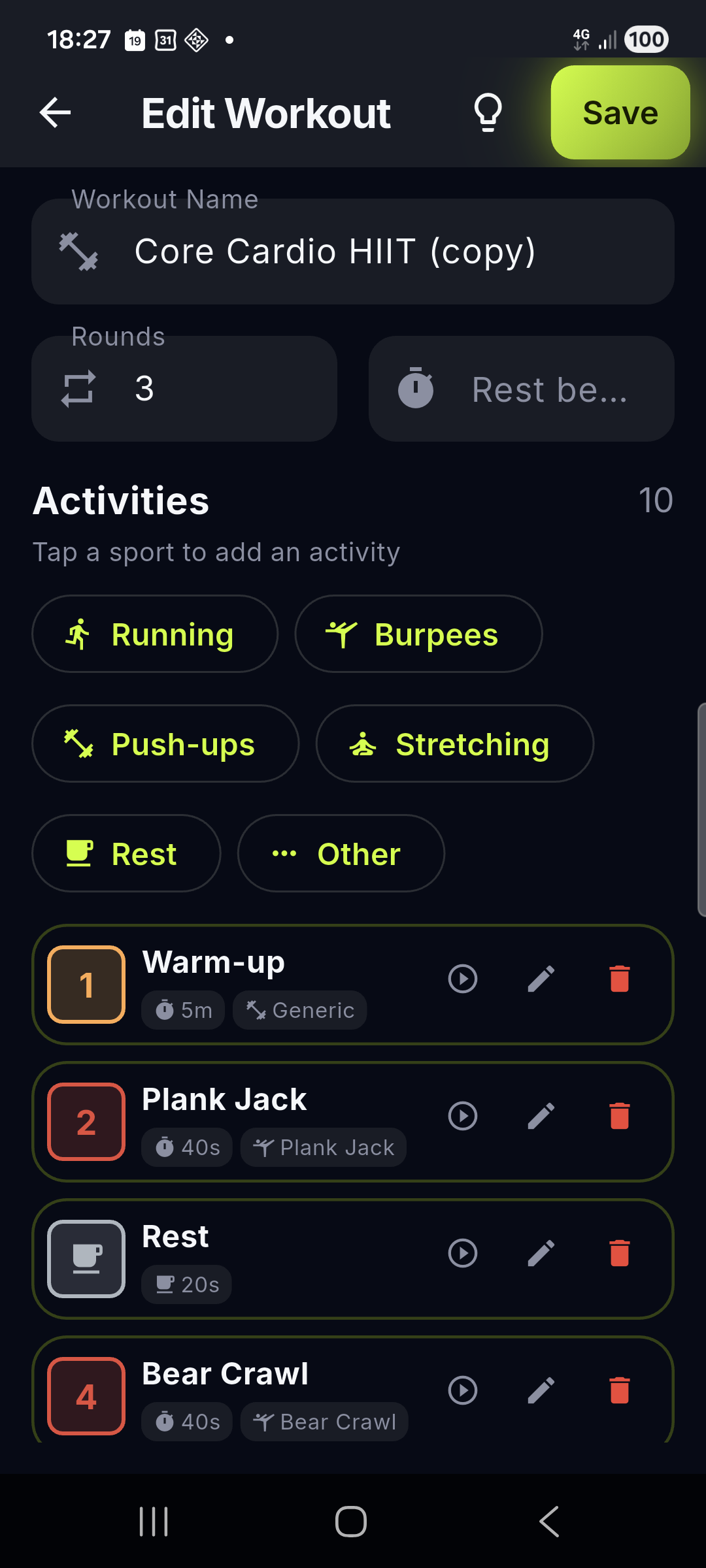
- Navigate to Workouts > My Workouts.
- Tap + to create a new workout.
- Name your workout (e.g., “Full Body Tabata”).
- Add blocks:
- Tap + Add Block.
- Choose a Name (e.g., “Sprint”).
- Select Type: Time / Distance / Reps / Open-ended.
- Select Kind: Workout / Warm-up / Cool-down / Rest.
- Choose an Activity (tap to browse, use the search bar, or pick one of the quick-add chips right in the form).
- Set Duration / Distance / Reps depending on type.
- Optional: set Weight target, Sets, Rest between sets.
- Toggle Ask for feedback if you want to rate this block after completion.
- Toggle Rest after block and set duration.
- Reorder blocks by dragging the handle (≡) on each block.
- Set rounds:
- Enter the number of times the block sequence repeats.
- Set Rest between rounds.
- Tap Save.
Note on block names: Default block names (Warm-up, Rest, “Activity 1”, sport names) auto-translate when you change the app language. Your custom names stay as typed.
Starting a Workout
- From the Workout Preview screen, review the structure.
- Tap Start.
- If there are distance blocks:
- GPS Priming screen appears.
- Tap Allow GPS or Continue without GPS.
- Start delay (0–15 seconds, configurable in Settings).
- The Timer Screen opens fullscreen.
Using the Timer Screen
The timer screen is your control center during a workout.
Display Elements
| Element | Description |
|---|---|
| Current block name | At the top (e.g., “Sprint”) |
| Activity name | Below block name (e.g., “Running”) |
| Timer / Progress | Center: countdown, stopwatch, or progress bar |
| Phase indicator | Shows current phase of the block |
| Overall progress | Bar at the bottom showing total workout progress |
| Next block | Small card showing what’s coming next |
| Countdown pulse | With the Overdrive style, the screen pulses during the last 3 seconds of a block |
Actions
| Action | How |
|---|---|
| Pause | Tap the pause button (⏸) |
| Resume | Tap the play button (▶) |
| Skip rest | During a rest block, tap Skip Rest |
| Skip work block | During a work block, tap Skip: the partial time or distance already done is still recorded |
| Stop workout | Tap stop (⏹), confirm |
| Mark reps set complete | Tap the checkbox (only in reps blocks) |
| Complete open-ended block | Tap Complete (only in open-ended blocks) |
| Rate block | After blocks with feedback enabled: tap Easy / Normal / Hard / Not completed — your choice stays highlighted for the whole rest |
Audio & Vibration
- Beep start: short beep when a new phase begins.
- Beep end: different-pitch beep when a phase ends.
- Vibration: short pulse at phase changes.
- All configurable in Settings > Audio / Vibration.
- Voice coach: 🚧 coming soon (a short spoken cue between the
T-1andGObeeps).
Background Behavior
| Scenario | Behavior |
|---|---|
| App goes to background | Timer, beeps and GPS keep running (foreground service with a persistent notification) |
| App comes back to foreground | You return to the timer screen, still in sync |
| Notification (GPS tracking) | Persistent notification: “Workout in progress” |
GPS Workouts
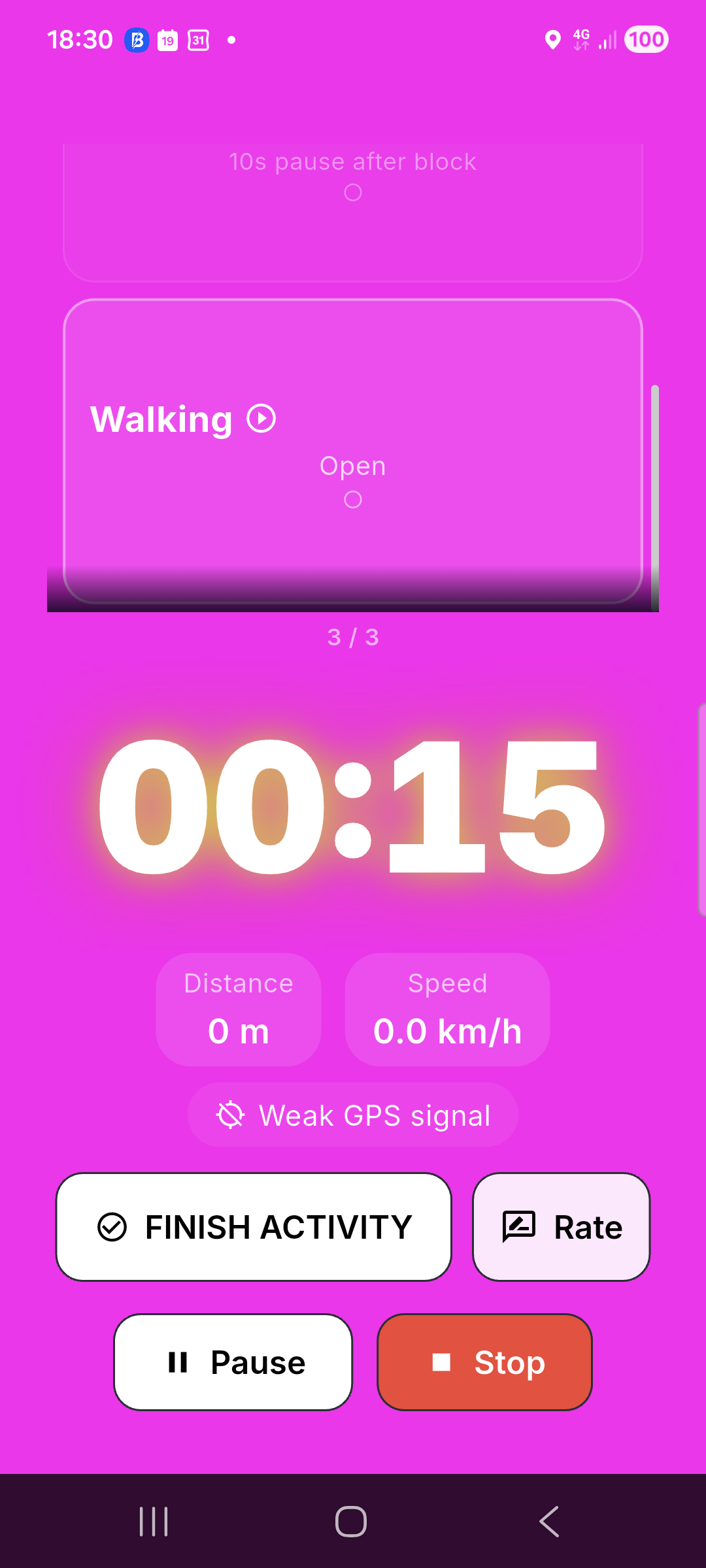
GPS is used for distance-based blocks in endurance activities.
Setting Up a GPS Workout
Create a block with type Distance and an activity like Running, Cycling, or Walking.
Example: Run with Repeats workout:
- Block 1: Run 400m (Distance, Running)
- Block 2: Rest 60s (Time, Rest kind)
- Round 1 repeats: 6 times
- Rest between rounds: 120s
During GPS Tracking
- Progress bar: fills from 0 to target distance.
- Distance readout: current distance covered.
- Speed: instantaneous speed in km/h or mph.
- Manual entry: tap the distance number to type a value (when GPS is off).
GPS Tips
- For best accuracy, keep your phone in an armband or pocket with a clear view of the sky.
- GPS data is only stored on your device.
- Blocktomic requests location permission only during active workouts.
- You can always choose to enter distance manually.
Reps & Gym Workouts
Setting Up a Gym Workout
Create blocks with type Reps for strength exercises.
Example: Full Body Gym workout:
- Block 1: Bench Press — 3 sets × 10 reps @ 60kg
- Block 2: Rest 90s (Time, Rest kind)
- Block 3: Squat — 3 sets × 12 reps @ 80kg
- Block 4: Rest 90s
- Block 5: Pull-ups — 3 sets × 8 reps
- Rounds: 1 (no repeat)
During Gym Workouts
- Each reps block shows: target weight, sets, and reps per set.
- Tap Complete Set after each set.
- Timer is independent — you control the pace.
- Use the rest blocks to time your recovery between sets.
Completed Workout
When you finish (or stop) a workout:
- Completion screen shows:
- Total duration vs. net training time
- Distance covered (if applicable)
- Average speed (if GPS used)
- Badges unlocked (with animation)
- Tap Back to Home.
- The session is saved to:
- History — full details
- Progress — streak updated, stats updated
- Calendar — heatmap updated
Sharing Workouts
- Open the Workout Preview (or tap the share icon on any card).
- Tap Share: a sheet opens with a QR code and a link.
- Send the link via any app (WhatsApp, Telegram, email, etc.) — or let a friend scan the QR code with their camera.
- The recipient opens/scans it:
- Blocktomic shows the Import Preview screen.
- They tap Import to add a copy to their library.
- A new unique workout is created (never overwrites existing).
- Online, a short anonymous link is generated; fully offline, the whole workout is encoded inside the link itself.
Pre-built Workouts
Blocktomic ships with 44 ready-to-use workouts across every family:
| Family | Count | Highlights |
|---|---|---|
| HIIT | 11 | Classic Tabata, HIIT 30/30, Pyramid 60/30, HIIT Total Burn, HIIT Lower Burn, HIIT Core Cardio, HIIT Explosive, HIIT Sprint, Core Cardio HIIT, AMRAP 15min, Deck of Cards |
| Gym | 10 | Strength 45/15, Full Body Circuits A/B, Upper Body Push/Pull, Lower Body Quads/Posterior Chain, Away Body A/B/C |
| Endurance | 5 | Run with Repeats, Fartlek Pyramid, Hill Repeats, Tempo Run, Long Run |
| Calisthenics | 5 | Push, Pull, Core, Skills, Beginner Base |
| Flexibility | 5 | Mobility Flow, Yoga Flow, Foam Rolling, Back Health Quick, Back Health Mobility |
| Other | 8 | Pomodoro Timer, Core Circuit, Plank Variations, Core Finisher, Active Recovery, EMOM 20min, Partner WOD, Bodyweight Strength Basics |
Each pre-built workout has a difficulty rating (Easy / Intermediate / Hard / Beast) and — where applicable — a catchy title you’ll see on cards when fun names are on (e.g. Classic Tabata → Phoenix Protocol).
Card durations are estimates: warm-up and cool-down count once, core blocks are multiplied by rounds.
You can duplicate any pre-built workout (keeping its catchy title) and customize it to your needs.